

About
My Practice: My background in instructional design and project management helps me balance creativity with structure — always keeping the learner at the center.
How I Work: I’m a hands‑on, collaborative problem solver. I love partnering with teams to translate messy, technical, or strategic content into learning that feels simple, modern, and helpful. I bring structure when it’s needed, creativity when it helps, and a steady, practical mindset throughout.
What Matters to Me: I care about work that supports people in real moments of need. Learning should make someone’s day easier, not harder. I value clarity, usability, and learning design that respects people’s time and attention.
What Inspires Me: Nature, travel, and the small wonders of the world. I keep bees, raise chickens, and have a soft spot for creatures many people avoid. I’m energized by new experiences, new places, and the joy of learning something unexpected.
What I'm Here to Do: I’m here to create learning that supports people — helping them feel capable, prepared, and a little more confident in their everyday work.


My Approach
My approach blends instructional design, project management, and storytelling, shaped by early experience writing “how‑to” programming for The Discovery Channel and years designing training in regulated, science‑driven environments.
I partner closely with SMEs and stakeholders to understand what people really need, then design learning that's practical and grounded in real-world performance. My process is structured but flexible, grounded in thoughtful needs analysis, clear design documents, and detailed storyboards.
I’m energized by new tools and technologies, and I use them to improve clarity and efficiency without ever losing sight of the learner. Above all, I care about creating learning that respects people’s time, supports their confidence, and helps them succeed.
My Work

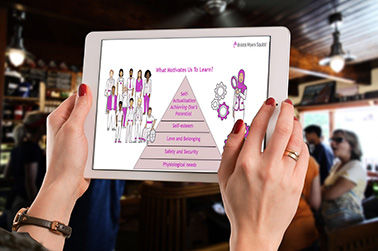


Future Project loading...
aCoach for Team Members
This module is one of a three‑version suite for Team Members, Managers, and Directors, each tailored to its audience.
The introduction shown here reflects the shared design across all versions. The full Team Member module includes step-by-step guidance but is not shown due to confidentiality.
Problem
With the launch of a new commercialization model, managers and directors were tasked with helping their teams adopt new ways of working. To support this shift, the organization needed stronger coaching relationships to drive consistent and ongoing development.
Solution
To meet this need, the team launched aCoach, a browser‑based coaching platform, supported by role‑specific modules offering targeted, step‑by‑step guidance. All modules shared a consistent visual and structural design across audiences.
Audience
Responsibilities
Tools Used
Commercial and medical field teams, including Therapeutic Area Specialists, Medical Science Liaisons, Medical Engagement Leads, and First Line Leaders
-
Script writer
-
Instructional designer
-
Project manager
-
Client liaison
-
eLearning developer
-
LMS coordinator
-
Articulate Storyline
-
ClipChamp (AI voice)
-
Adobe Media Encoder
-
BMS branded visual assets
-
Learner-centered design
My Process

Analysis & Goal Definition
-
Researched the organizational rationale behind new commercialization model.
-
Identified upskilling priorities across all field roles.
-
Assessed the impact on leaders and their teams.

Design the Solution
-
Created a design document outlining learning goals, objectives, topic flow, module structure, and proposed interface mockups.

Develop the Solution
-
Created storyboards detailing content screens, graphic descriptions, narration, navigation, and on‑screen instructions.
-
Obtained storyboard approval.
-
Developed downloadable resources for use within the module.
-
Built the alpha version with scratch narration and placeholder visuals.
-
Build the beta version for user testing and feedback.

Test & Evaluate
-
Shared Articulate Review links with content experts and incorporate feedback.
-
Used knowledge checks to assess participant recall and understanding.
-
Used QStream to measure application of learning on the job.
Storyboard Excerpt (Scenes 1-6)
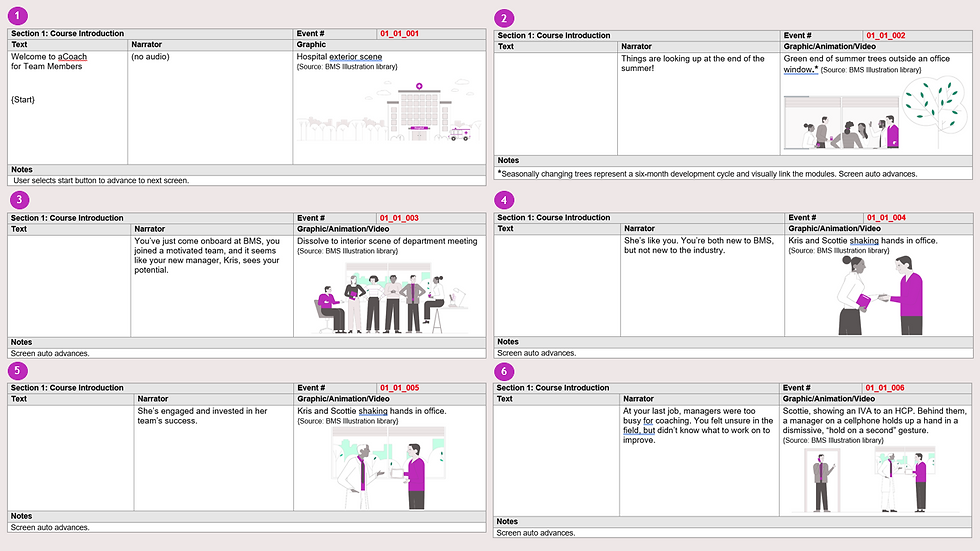
Project Demo: aCoach For Team Members
Preview the opening scenario and introduction to the aCoach platform.
This excerpt highlights the narrative setup and introductory pacing and flow.
Level Up Your Learning
This brief animated video was created to help new BMS training teams, many without adult‑learning backgrounds, see how short-form video and game-based learning can strengthen their training toolkit. I wrote the script and produced the video using Simpleshow, a platform for building story-driven explainer videos, available across training teams.
Problem
Training teams managed a library of existing Foundational Modules but lacked a scalable strategy to supplement and reinforce that content while reducing the time burden on trainers, especially those onboarding new hires. Many were also unaware of enterprise learning tools such as Simpleshow and The Training Arcade®, or how these tools could support sound instructional design practices.
Solution
A short animated explainer video was produced to introduce key instructional design principles and raise awareness of two enterprise‑supported learning tools: Simpleshow and The Training Arcade®. The video was designed to show how short-form video and game-based learning, derived from approved topic decks, can be used to supplement and reinforce core content.
Audience
Responsibilities
Tools Used
BMS medical and commercial training teams
-
Instructional designer
-
Script writer
-
Video producer
-
Client liaison
-
Simpleshow
-
Artlist.io (music)
-
Professional voiceover
My Process

Analysis & Goal Definition
-
Met with the client to clarify training objectives and define the target audience.
-
Surveyed training teams to identify gaps in tool awareness and best ID practices.
-
Selected Simpleshow and The Training Arcade® as the featured tools based on enterprise availability and audience needs.
-
Established success criteria, including increased tool awareness, reduced trainer workload, and improved learner engagement.

Design the Solution
-
Developed a design brief outlining learning goals, key messages, video structure, and animation style.
-
Mapped script concepts to Adult Learning Theory to ensure relevance and research‑based messaging.
-
Created a scene‑by‑scene storyboard detailing narration, visuals, and on‑screen messaging.
-
Secured client approval before moving into production.

Develop the Solution
-
Wrote and refined the full script to align with Adult Learning Principles and client objectives.
-
Built the video in Simpleshow, selecting visuals, animation style, and pacing to reinforce key concepts.
-
Applied chunking and clean‑motion animation techniques to reduce cognitive load and maintain engagement.
-
Finalized and published the completed video through the Simpleshow platform.
-
Shared the draft video with the client and subject‑matter experts for review.
-
Incorporated feedback and refined the script, visuals, and pacing.
-
Conducted a final quality check for accuracy, consistency, and alignment with objectives.
-
Delivered the final video link for deployment to training teams
Test & Evaluate

Storyboard Excerpt (Scenes 1-8)
Project Demo: Level Up Your Learning
Explore a short animated explainer demonstrating how concise visuals
and narration can reinforce core training concepts.
Welcome to Nashville: Performance Support Example
This short interactive demo was designed as a creative, context-appropriate touchpoint for Springer Healthcare's account representatives at an annual industry trade show held in Nashville, Tennessee. Built in Articulate Storyline and deployed on iPads at the conference booth, the module used Nashville's iconic culture — pawn shop guitars, country song lyrics, and the Grand Ole Opry — as the backdrop for a playful guided tour experience.
Problem
Springer Healthcare's account representatives needed an engaging, low-pressure way to start meaningful conversations with attendees during a busy cocktail-hour environment. Traditional booth materials including brochures, slide decks, and verbal pitches, often failed to capture attention in a social, high-traffic setting where attendees were not actively seeking vendor discussion.
Solution
A brief, light, facilitated experience gave representatives and attendees a shared, low-stakes topic of conversation that felt natural in the conference setting. Instead of telling clients what Springer Healthcare could do, the module showed it through game-based learning, interactivity, and visual design. The experience concluded with an easy, low-pressure invitation for attendees to return the next day for
a deeper conversation about Springer Healthcare's projects and services.
Audience
Responsibilities
Tools Used
Conference attendees (new & existing clients); Springer Healthcare account representatives
-
Instructional designer & content strategist
-
Writing & module development
-
Visual direction (including stock‑image research, visual prototypes, and collaboration with graphic artist)
-
Audio direction (incl. stock‑music and SFX research)
-
Review and quality assurance across narrative, visuals, and user experience
-
Articulate Storyline
-
Adobe Photoshop/Illustrator (in collaboration with graphic artist)
-
Stock image and music libraries
-
Internal review & collaboration tools
My Process
Analysis & Goal Definition
-
Considered conference environment, booth placement, and traffic flow.
-
Selected Nashville’s cultural identity as the thematic anchor for the experience.
-
Defined success criteria: a natural, engaging, under‑five‑minute conversation that ended with an invitation to reconnect.
Design the Solution
-
Created a design brief outlining purpose, tone, constraints, and iPad‑based delivery.
-
Mapped a short narrative journey through Nashville landmarks.
-
Developed a storyboard for the Pawn Shop, Song Camp, Grand Ole Opry scenes, and the navigational map.
-
Chose the Nashville map as the central navigation hub to create a cohesive sense of place.
Develop the Solution
-
Built the module with branching, layered interactions and timed mechanics.
-
Designed the Pawn Shop guitar‑chord interaction using layered slide states.
-
Developed the Mad Libs‑style songwriting activity with lyric patterns, contextual clues, flexible word choices, and smooth interaction mechanics.
-
Created the timed Song Title Matching game with feedback for correct, incorrect, and time‑out responses.
-
Designed the Grand Ole Opry scene featuring humorous “feedback” characters.
Test & Evaluate
-
Reviewed the module with account representatives to ensure it supported natural, guided booth conversations.
-
Tested layers, game timing, and feedback behaviors for accuracy and responsiveness.
-
Evaluated pacing, tone, and visuals to ensure a festive, cocktail‑hour feel rather than a formal demo.
-
Finalized and published the module for iPad deployment.
User Guide for Account Representatives


Project Demo: Welcome to Nashville
View a short Nashville‑themed interactive demo designed to help representatives start light, engaging conversations with booth visitors in a casual high-traffic setting.
A Thoracic Surgery Master Class
An excerpt from a master‑level program designed to elevate the clinical fluency of experienced sales representatives. Anatomy refreshers, lung cancer staging essentials, surgeon perspectives, and a real patient case are blended to help learners engage more meaningfully with thoracic customers.
Disease State: Head and Neck Cancers
This learning experience provides a clear, structured introduction to head and neck cancers, then follows a fictional patient through his clinical journey to illustrate how risk factors, early symptoms, and diagnostic steps unfold from a patient’s perspective. (This course has no audio).
Microlearning Strategies
XYZ. (This course has no audio).
Start a Conversation
Tell me about your project or reach out to say hello.